
Luma Motion 2.0 is live - here's what's new
Faster previews, render and flatten in place, If/Else rules, a rebuilt module system, team messaging and more. Everything new in Luma Motion 2.0.
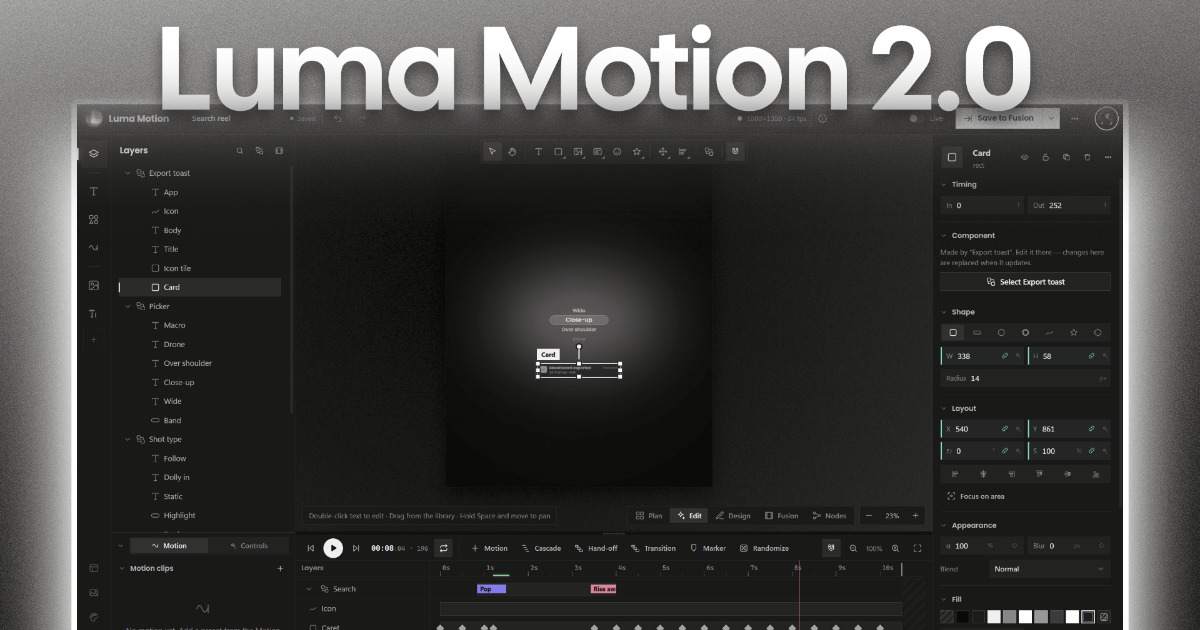
Luma Motion 2.0 is here, and it is our biggest update so far. If you have been waiting for native motion graphics in DaVinci Resolve (that doesn't feel like a compromise), we have exciting news for you.
What's new in 2.0
Faster than ever
Previews were rebuilt from the ground up. You get exact filter regions, baked texture noise, GPU drop shadows and a fast preview while playing. The new Frame cache remembers what has already been rendered in the viewer, so scrubbing and replaying a busy scene - even one with dozens or even hundreds of layers - can be done in real time. Cache while playing, cache when idle, or cache your whole play range. Change cache settings (and clear when needed) via Preferences › Cache. Cache is enabled as a base feature for all plans.
Heavy scenes? No problem.
- Render and flatten in place turns any stack of layers into a single image-sequence layer. A scene with hundreds of layers is then drawn as one picture per frame, and playback stays smooth however complex the build was. Nothing is lost: the original layers travel inside the flattened one, so Revert to original layers brings every one of them back instantly, and undo works too. Flatten the same layers again later and the frames are found, not re-rendered.
- Render and flatten in place is available on every plan.
-
- Render as clip exports the finished scene to a video file, in a lossy or lossless codec that you choose. You can choose the codec (with plain guidance on what each is best for, including lossless and alpha), export size (which can differ form the comp size), frame rate, and range. Ultra adds the Ultra render engine, which draws every frame at twice the size and filters it down for cleaner edges and better motion blur.
- Render as clip is currently available for all Pro, Ultra, and Team plan users.
Modules & Logic-based features
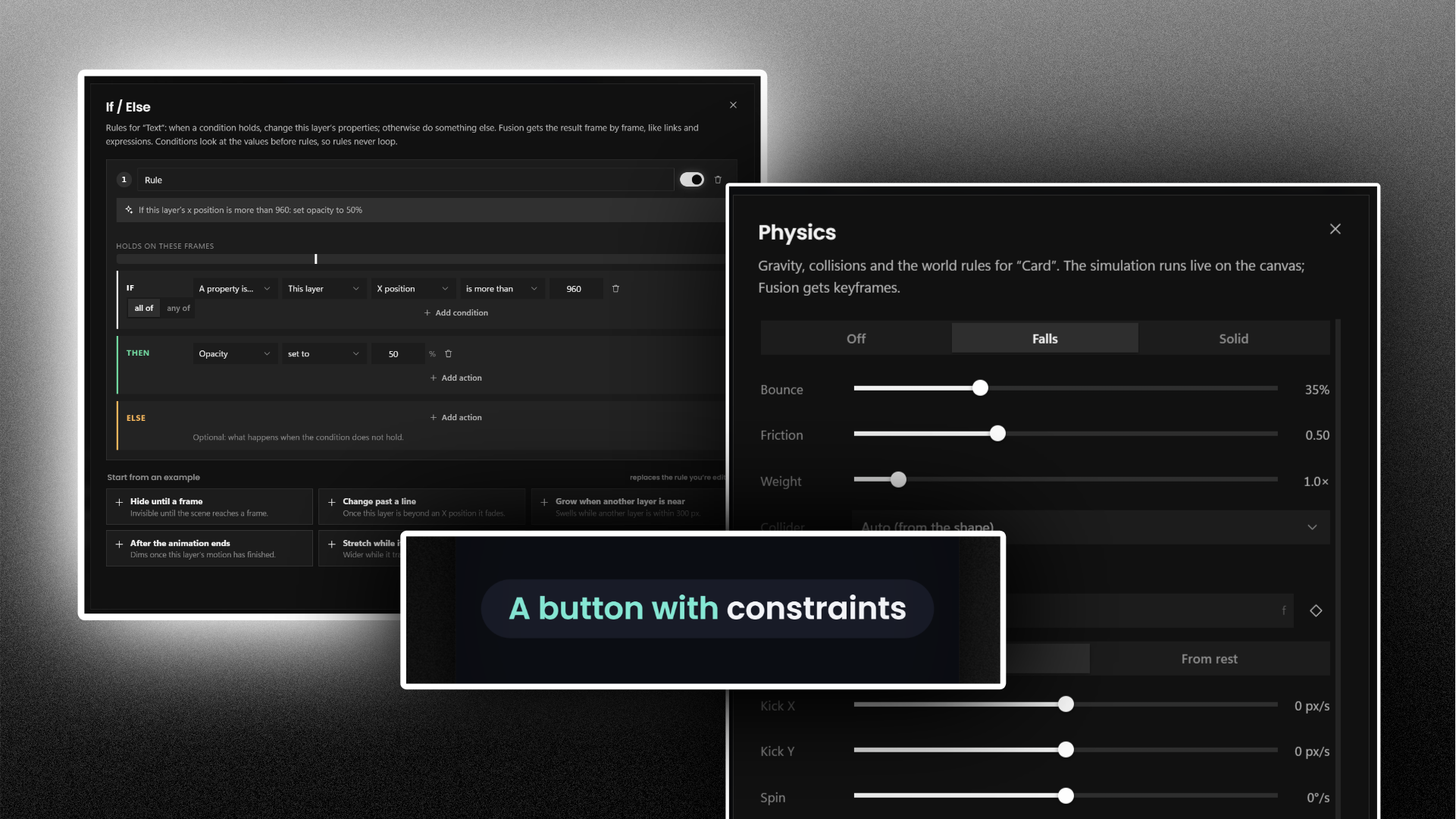
Modules add different "logic" or "rules" to scenes within your composition, allowing for easier or sophisticated animations or effects that would otherwise be very complicated (or impossible).
- If / Else rules let a scene react to itself. A layer can modify itself based on changes to another layer. Example changes included a property (scale, position, colour, etc.), a distance, a clip's status, the elapsed composition time, and more. Because If / Else rules utilize Fusion's powerful Expressions system, these can be expanded to include nearly any Fusion property (and is easy to customize via the visual If / Else rules editor).
- Jitter gives you stop-motion boil, holds and poses. Shake gives you the Fusion-style handheld wobble, without leaving the editor.
- Falloff, Proximity and Letter morph make type and shapes flow into one another.
- Constraints (Hug and Pin) keep a label glued to its box when the text changes.
- Rigid-body physics, links, expressions and a pick-whip connect anything to anything.
- Cascade and Hand-off carry one beat into the next.
30+ Fusion-Native effects
- Luma Motion 2.0 ships with more than 30 Fusion-native effects you can see, modify, and render directly in the editor. Each one becomes a real Fusion node when you send the scene to Resolve.
-
- Among these effects are:
- Glow, Bloom and Light rays: make bright things feel lit. Add a soft halo to a logo, a neon sign or a title. Drop shadow and Stroke:lift text and shapes off any background.
- Gaussian, Directional and Tilt-shift blur.
- Glitch, RGB split, VHS and CRT:Add instant retro and tech looks.
- Wave, Twist, Spherize and Lens distortion:bend and distort layers in real time.
- Repeater, Tile and Echo:build patterns, grids, trails, faux motion blur, and more.
- Jitter gives you stop-motion-like frames.
- Shake gives you the Fusion-style handheld wobble, without leaving the editor.
- ...and lots more!
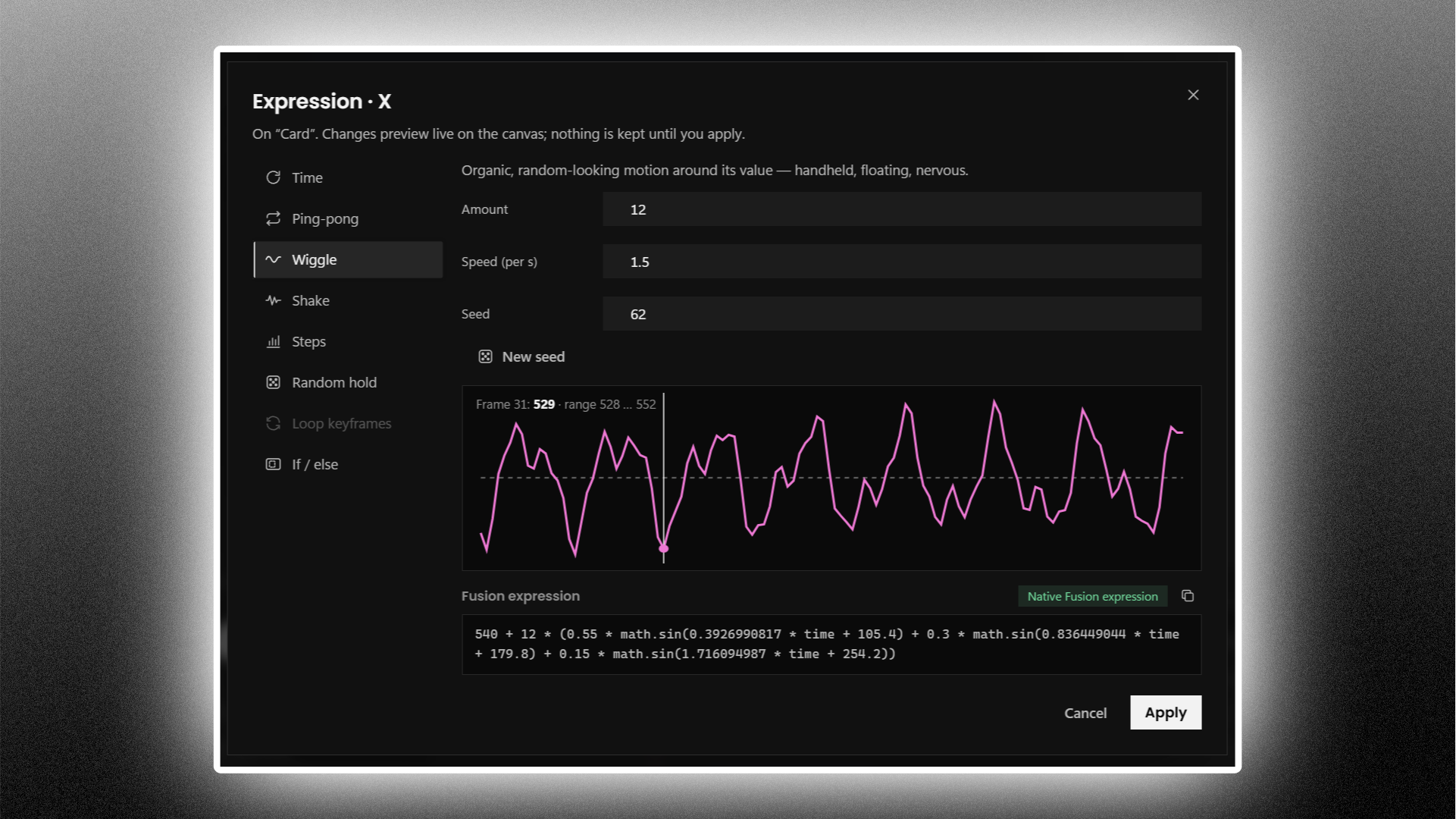 Luma Motion Visual Expressions Editor.
Masks, cut-outs, and parallax
Draw masks right on the canvas. Sketch a mask on the layer, then feather it, expand it, or use it as a track matte for another layer. You can reveal one element through another without leaving the preview.
Cut out a subject in one click.
This feature - built directly into Luma Motion - allows you to utilize integrated (SAM 2.1) models to detect elements of a photo or image, and isolate them (mask them out). Extremely useful (and saves a ton of time) for motion graphics and photo-to-animation-based workflows.
2.5D (Parallax) Stage
Create and edit parallax scenes from flat photos or images. Choose what layers should be part of the parallax scene, set how far back each layer sits, and move the camera to get real depth without the complexity of a 3D node-based workflow. Everything stays editable, and is rendered in Fusion via ImagePlane3D, and other native camera nodes.
Expand Luma Motion with modules
Luma Motion ships with several useful modules, including Text, Shapes, Components, and Motion. You can add new modules via the + icon to the centre of the modules sidebar, allowing you to browse and add new, project-specific modules that can provide utility for that specific project. All modules are included in Pro, Ultra and Teams.
Modules include:
- Basic components: auto-fit labels and badges, a UI kit, recordable cursors, glass cards, device frames and simple charts.
- Backgrounds: solids, gradients, mesh, liquid, light and patterns.
- Captions: build them from your Edit page, an .srt, a .vtt or a script. Active word, Pop words, Boxed and Documentary styles are ready to go.
- Camera: push-ins, orbits, whips, drifts and depth for 2D layers.
- Audio reactive: bass, mids, highs and beats drive any value you choose. Equalizers, pulse rings and beat flashes are built in.
- Background Builder: mesh, conic and turning gradients, glows, dots, waves and stars, with ten palettes and ten looks to start from.
- Screens: turn screenshots into a product reel with automatic targets, a cursor, clicks and a one-click rebuild.
- Mockups: place your work in phones, laptops and browser frames.
- Charts: twelve chart types, a real spreadsheet editor (paste from Excel or Google Sheets, import CSV or XLSX), formulas, trend lines and statistics, all animated.
- Live charts: a chart that follows your spreadsheet and rebuilds in place when the numbers change.
- Sound Design: a library of procedural sound effects you can audition, shape and place on your timeline.
- Unsplash: search and drop in photos, with the photographer credited for you.
- Team media and Brand kits: one shared library, with a folder for every brand.
For Teams working together
Teams is built for people who make things together:
- Team messages give every project its own running conversation, right inside Luma Motion. Everyone on the team can read it and post in it, and your profile picture shows a number when someone has written since you last looked. No switching apps to ask "which version is final?".
- Invite people by email, with admin and member roles.
- Share media, components, themes and templates, and keep cloud projects the whole team can open.
- Manage the whole library from the website.
Built for real work
- Live sync keeps your Fusion comp in step with every change, and a conflict dialog protects edits you make in Fusion.
- Save to Fusion as one undoable group or loose nodes, with a tidy node layout and Underlay boxes. Your markers arrive as clip markers.
- A built-in updater tells you when a new version is ready and installs it without a trip to a download page.
- Your account (and plan) can be activated on up to two computers per seat, and your themes and shortcuts are saved to your account.
Plans
Luma Motion 2.0 has four plans: Free, Pro, Ultra and Teams, with monthly and yearly billing. Free is a real editor, not a trial. You get the canvas, the timeline, keyframes, effects, masks, ~80 templates, captions and native Fusion output, forever. Pro and Ultra include every module, and Ultra adds the Ultra render engine. Teams brings the shared library and the whole team's seats. Every module can also be bought on its own with a lifetime licence for $99 once, with lifetime support & updates.
Get it now
Download Luma Motion 2.0 from DaVinci Market, open it from the Fusion page in DaVinci Resolve, and create your free account. If you are already on an earlier version, the updater will offer 2.0 the next time you open the app.
We built this for editors who are tired of choosing between speed and control. Open it, make something, and show us what you made. Tag us on Instagram or X @lumamotion_app -- we love seeing what you use Luma Motion for!
Questions, bugs, or feature requests? Use Report a bug or Feature request inside the app, or email support@lumamotion.app