From layers to native nodes.
Understand Save to Fusion, Live sync and the editable composition.
Two views of one idea
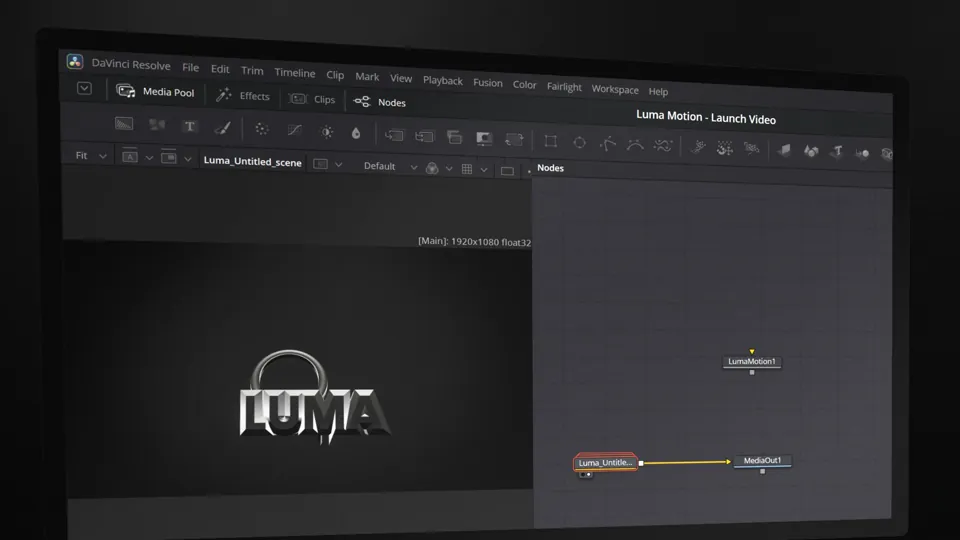
Luma Motion uses a scene model for visual editing. Save to Fusion compiles that scene into native tools: Text+, shapes, transforms, merges and 3D stages where the scene calls for them. The result is a composition you can inspect in Resolve.
Pick the right connection
Save to Fusion
Compile the current Luma scene into an undoable group or loose native nodes for a deliberate handoff and review.
Live sync
Keep a Luma-owned output updated as you continue authoring. Resolve prompts you to resolve recognized edits made to generated nodes.
Reopen from Fusion
Read the Luma scene snapshot from output previously generated by Luma. This restores the scene model; it is not a general comp importer.
Continue the finish in Resolve
Use the native composition to integrate the design with footage, masks and other comp elements. Check text, frame range, edges and timing in context; then render a short range before committing to the full sequence. Access to Fusion controls does not remove the need to review the final render.
- Confirm the correct composition and frame range are active.
- Inspect generated nodes and confirm the expected output reaches MediaOut.
- Review the opening, middle and closing frames over the real shot.